Itegin Baltabaev

Linux & Monitoring Engineer

Linux system administrator focused on monitoring and incident analysis. I run the company's infrastructure single-handedly: servers, network, workstations and user support. I set up Prometheus and Grafana with alerts to Telegram — I learn about failures before users do; I find the cause from metrics and logs and record the outcome in Jira. I work with SQL and REST APIs. I take my own services to production myself: two web applications run in Docker with public access over TLS.

I deployed and run this site myself: first on a home server built from a written-off PC, now on a VPS — Docker, nginx with TLS, daily database backups.

github.com/Itegin t.me/itegin Russia Format: remote / hybrid
Itegin Baltabaev

Work experience

2 positions · since June 2025

System Administrator — LLC Rosagromash (hybrid)

June 2026 – present Introduced monitoring with Prometheus and Grafana and alerts to Telegram: I learn about failures before users do, not from their phone calls Introduced ticket tracking in Jira and a knowledge base: no request gets lost in messengers, and common problems are solved from ready-made instructions Took over infrastructure with no documentation and restored it: network diagram, inventory of equipment and accounts

The company's only IT specialist across two sites (Stavropol, Verkhnerusskoye).

Responsibilities
  • Administration of Linux (Debian, Ubuntu, Astra Linux) and Windows Server machines, virtualization on Proxmox VE
  • Monitoring of servers and services, incident analysis from metrics and logs
  • Office and warehouse network and Wi-Fi: routing, switching, troubleshooting
  • Backups and restore verification
  • Server side of 1C (access, updates, licenses, RDP), video surveillance, electronic document exchange (EDI), electronic signatures; user support: PCs, MFPs, email
Achievements
  • Moved services to Docker: a service comes up from a definition instead of being configured by hand all over again
Tools
  • Prometheus
  • Grafana
  • Jira
  • SQL
  • Docker
  • Docker Compose
  • Proxmox VE
  • Debian
  • Ubuntu
  • Astra Linux
  • Windows Server
  • 1C
  • RDP

System Administrator — LLC TD Inter Fyuchers (hybrid)

June 2025 – June 2026 · 1 year 1 month Designed and deployed a HiWatch video surveillance system from scratch: camera placement, recorder, viewing from a phone via Hik-Connect Moved support to a remote format with AnyDesk and RustDesk: I close typical requests without a trip to the office Automated routine tasks with Bash and Python scripts

An office of 8 workstations: all of the IT was on me.

Responsibilities
  • Office network: routers, Wi-Fi, internet connection, fault diagnosis
  • User support remote and on site: PCs, peripherals, software
  • Video surveillance maintenance: cameras, recorder, access to recordings
Tools
  • Keenetic
  • TP-Link
  • HiWatch
  • iVMS-4200
  • Hik-Connect
  • AnyDesk
  • RustDesk
  • Windows 10/11
  • Bash
  • Python

Key skills

monitoring · logs · Linux · networking · SQL and API
Monitoring and logs
  • Prometheus
  • PromQL
  • Grafana (dashboards, alerts)
  • Kibana
  • Filebeat
Support and incidents
  • Jira (JQL, SLA)
  • knowledge base (runbooks, postmortems)
  • escalations
  • incident analysis
Linux and virtualization
  • Debian
  • Ubuntu
  • Astra Linux
  • systemd
  • journalctl
  • Proxmox VE
  • Windows Server
Containers
  • Docker
  • Docker Compose
Networking
  • TCP/IP
  • DNS
  • HTTP/HTTPS
  • TLS
  • NAT
  • VPN (WireGuard)
  • SSH tunnels
  • Nginx
Data and APIs
  • SQL (JOIN, CTE, transactions)
  • REST
  • Postman/Newman
  • curl
  • DevTools
Scripting and tools
  • Bash
  • Python
  • Git

Projects

monitoring · logs · API · self-hosted

IT-Deck

FastAPI · PWA · C++ · WebRTCv0.6.1 ·

An old iPhone becomes a control deck for a Windows PC: tiles show the real state of the computer, and the phone doubles as a webcam. FastAPI + SQLite, a Windows agent in Python, a PWA with no build step, a video receiver and virtual camera in C++.

Project page
IT-Deck

remote control deck and webcam · github.com/Itegin/it-deck
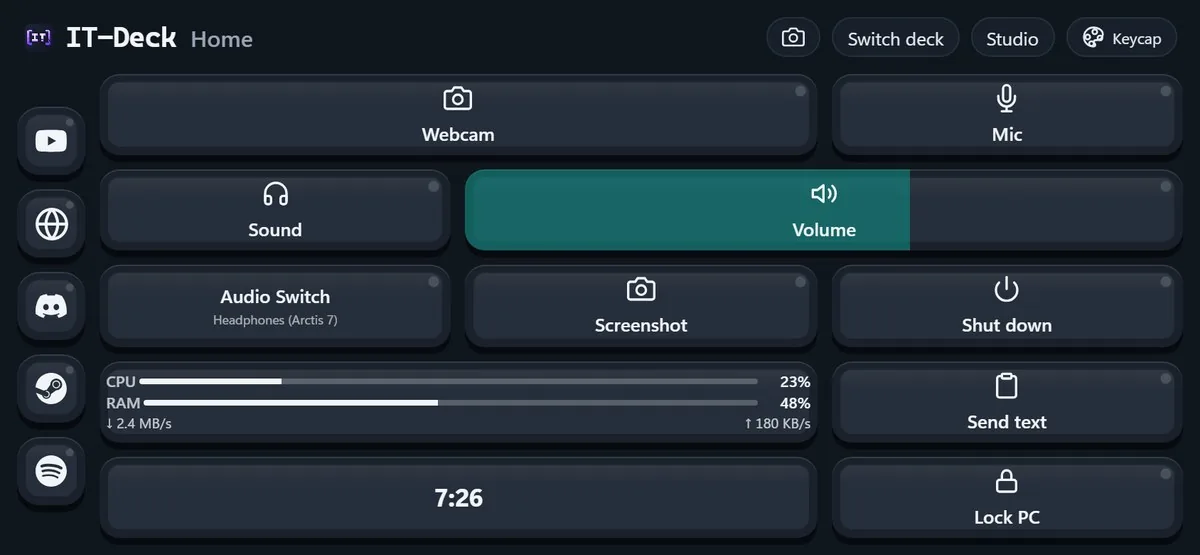
  • IT-Deck — the Home deck in the Keycap theme, phone held horizontally: a wide Webcam tile, Mic, Sound, a Volume slider, Audio Switch, Screenshot, Shut down, PC load, Send text, a clock and Lock PC, with the quick-launch panel on the left
    The Home deck, Keycap theme
    Self-hosted remote control for a PC from a phone: FastAPI + SQLite backend, a Windows agent in Python, a PWA frontend with no build step (vanilla JS); two-way realtime exchange of commands and status over WebSocket — tiles show the real state of the PC (microphone, volume, output device, VPN, webcam)
  • Phone as a webcam for Windows 11: video over WebRTC into a C++ receiver (GPU decoding) and on into a custom virtual camera — Discord, Zoom and OBS see it as an ordinary camera
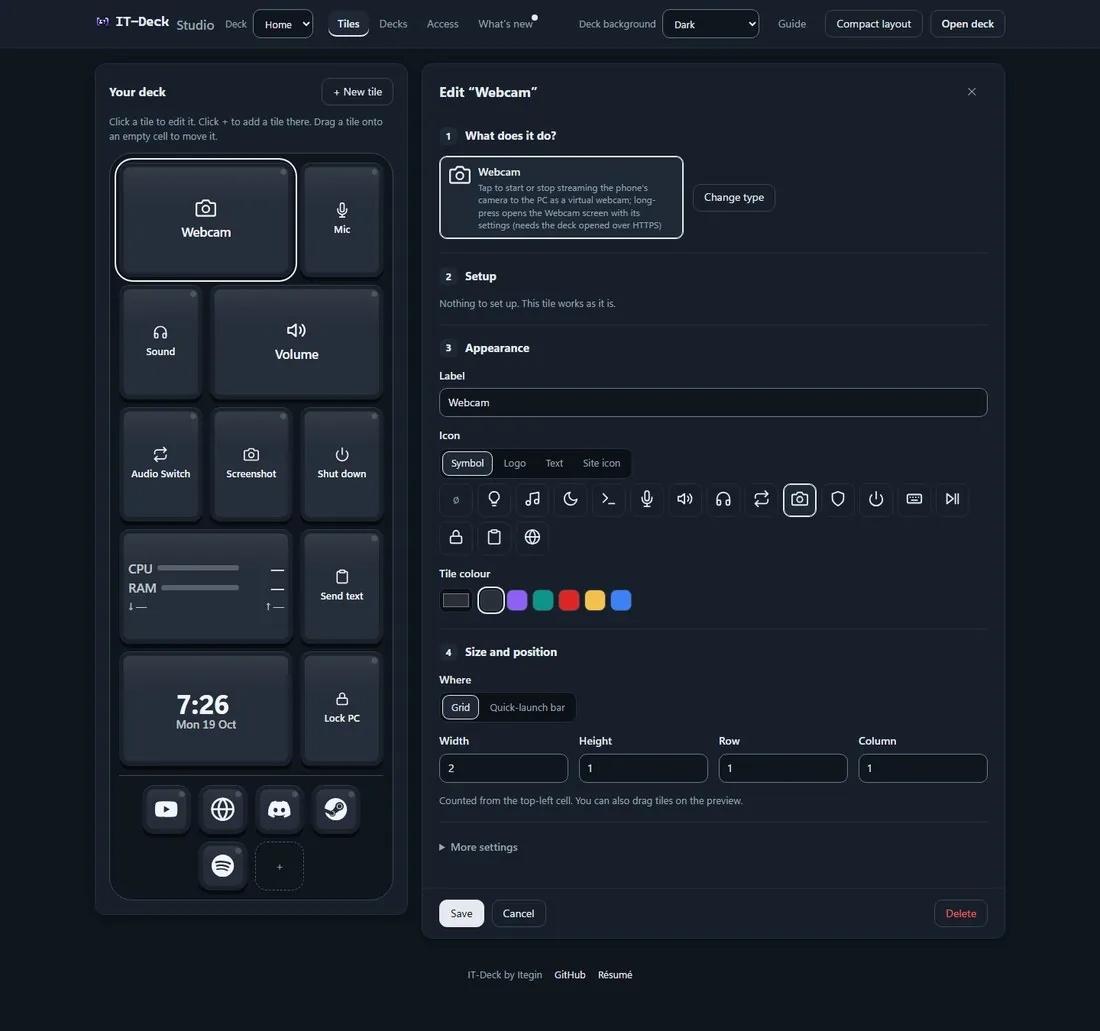
  • IT-Deck Studio in the Graphite style: a live preview of the Home deck in the Keycap theme and the Webcam tile editor — icon, color, size and position; the top bar shows Decks, Access and What's new
    Studio: deck preview and tile editor
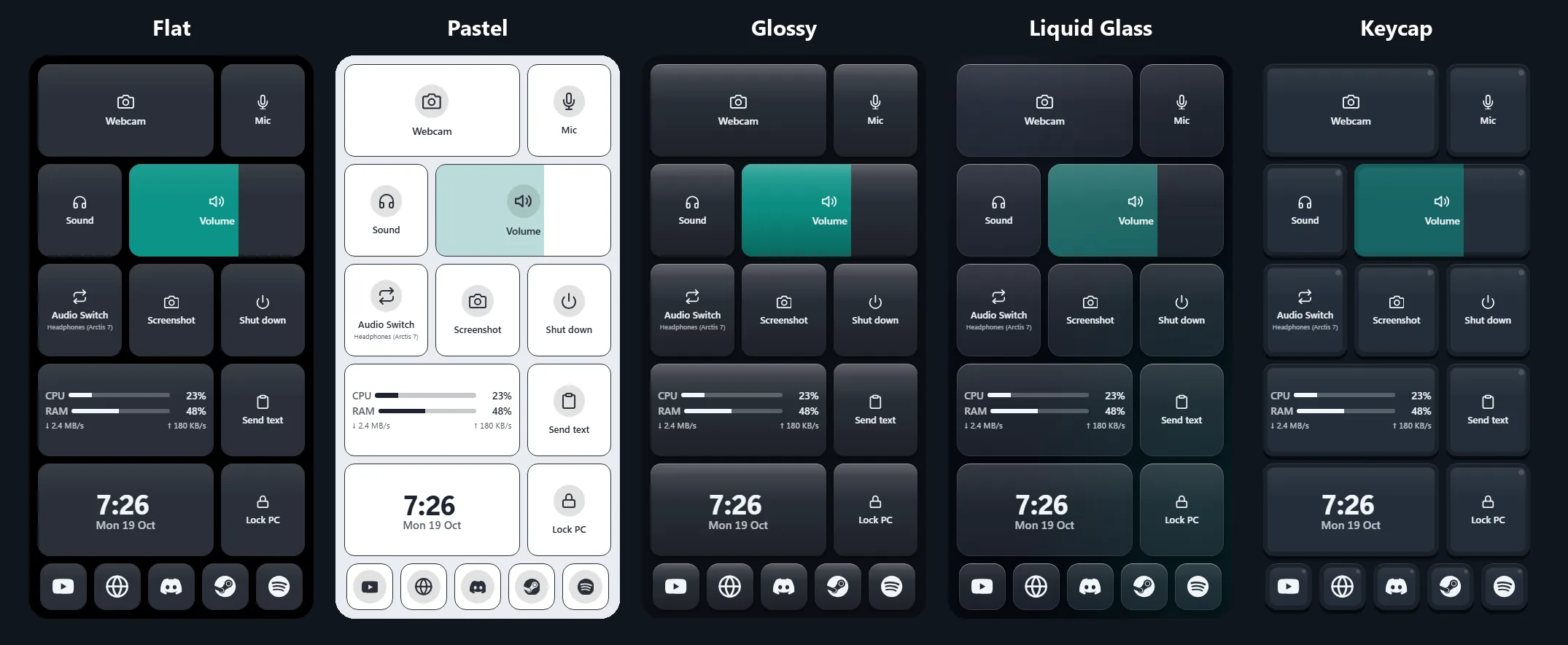
    IT-Deck — the same Home deck in five tile themes: Flat, Pastel, Glossy, Liquid Glass and Keycap
    One deck in five themes
    Studio — a deck editor on the PC: live preview (click to edit, “+” for a new tile, drag and drop), a step-by-step editor with action selection from cards instead of JSON, EN/RU; a “Clock and Weather” widget (Open-Meteo, backend cache), five themes — Flat, Pastel, Glossy, Liquid Glass, Keycap — with light and dark backgrounds; six deck templates
  • Quick-launch panel: websites (presets for Telegram, Discord, YouTube…) and programs picked straight from the PC's Start menu, including Microsoft Store apps; without a connection to the PC the deck turns into a full-screen clock
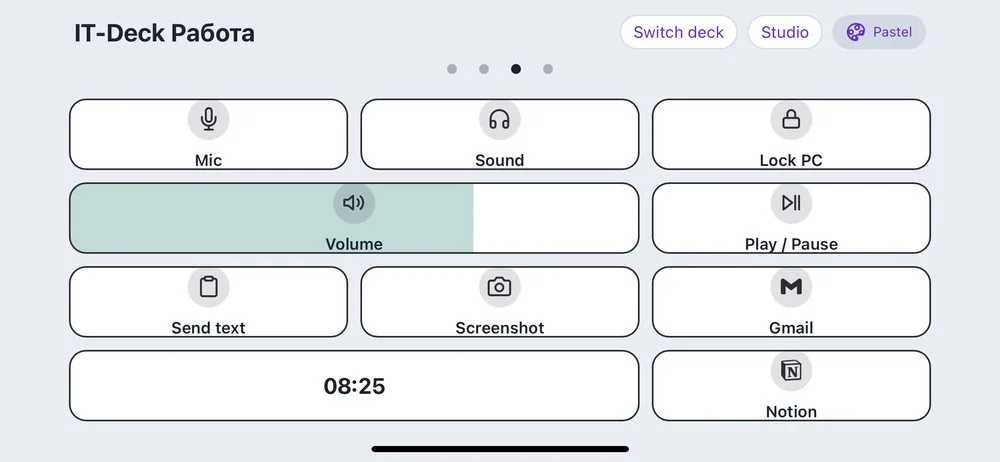
  • IT-Deck — the second deck (“Work”) in the Pastel theme: microphone, sound, PC lock, volume, media keys, sending text, deck switching dots
    The second deck, “Work”, Pastel theme
    Action tiles: hotkeys, media keys, PC power, sending text to the clipboard, a PC load widget (CPU/RAM/network); several decks with swipe, templates and import from a file; changing tokens from Studio without editing configs; the agent does not poll the system while the phone is not open and runs at a lowered priority so as not to take FPS away from a game
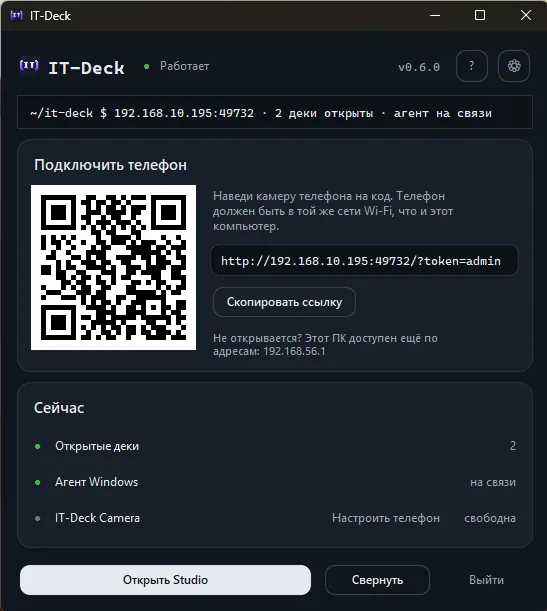
  • The IT-Deck window on the PC: a “Connect phone” card with a QR code and a link, a “Now” card with open decks, the Windows agent and IT-Deck Camera, and “Open Studio”, “Minimize” and “Quit” at the bottom
    The PC window: QR code and status
    Standalone build: a single ITDeck.exe (PyInstaller onefile) launches itself as two processes — backend and agent — with a supervisor and auto-restart; a window with a QR code for the phone, live status of the decks, the agent and the camera, and an update check
  • CI/CD on GitHub Actions: tests on Linux and Windows on every push; the tag v*.*.* builds the exe (and the native C++/vcpkg part); a release is published by a manual run with a version check
  • Server variant: Docker Compose + an Ansible playbook for Debian 12 — Docker, ufw, Nginx as a TLS reverse proxy with WebSocket support, cron backups, Prometheus + node_exporter
  • Releases on GitHub (free for non-commercial use; closed source)

Click a node in the diagram — below it expands to show what it does.

Backend

FastAPI + SQLite · exe or Docker

The backend is FastAPI with SQLite. It serves a REST snapshot of the state, serves the frontend's static files and handles both WebSocket routes — to the Windows agent and to the phone. The main mode is a separate process inside ITDeck.exe right on the controlled PC; the previous option is a Docker container on a separate server.

Windows agent

Python · persistent connection

Keeps a persistent connection to the backend and executes the commands that arrive. Local state — for example, whether the microphone is muted — it polls on a timer and sends back.

PWA dashboard

vanilla JS · no build step

A frontend with no build step: plain JS and CSS served straight from disk. It talks to the backend over its own WebSocket — tap a tile, the command is sent.

Iteginbook

itegin.com
  • Multi-user web learning tracker: Flask + gunicorn in Docker, SQLite; authentication written from scratch (scrypt, CSRF, guest access), migration from a single-user to a per-user schema without data loss
  • Publishing a service from behind CGNAT: a Debian home server + VPS, SSH tunnel (autossh + systemd) with auto-recovery; Nginx reverse proxy with TLS (Let's Encrypt) next to Xray/VLESS, DNS via DuckDNS
  • Security audit of my own code: fixed open redirects, unsafe port publishing, a credentials leak into the image; incident diagnostics from systemd/journalctl logs, fail2ban
  • (the page you are reading is built on it)
See how the site works, live

Lessons are visible only to those who are logged in — but here is how it all works: the same lessons with a list on the left, a table of contents and “completed” marks, only with different content. No registration or password.

Ops lab: monitoring, logs, API

Grafana · Kibana · PostgreSQL · Postman
  • Grafana: dashboards on Prometheus metrics (PromQL) and SQL panels from PostgreSQL, variables, annotations, alerts; configuration stored as files
  • ELK: delivery of JSON logs through Filebeat, incident investigation in Kibana by request_id (KQL, Lens, p95, 5xx share) with the outcome going into a ticket and a postmortem
  • Training service tickets-api in Docker: REST contract, webhooks; analysis of 4xx/5xx errors and CORS — finding where it broke: on the frontend, on the backend or in the network
  • PostgreSQL: helpdesk schema, JOIN, CTE, transactions and privileges
  • Postman: collections, environments, tests and request chains, runs via Newman, Mock Server
  • Jira and Confluence: a support workflow with SLA, JQL filters and a dashboard, runbooks, knowledge base, postmortem

Home infrastructure on Debian

Nextcloud · Nginx · OpenWrt
  • Nextcloud AIO on a decommissioned PC for file storage and sync; Nginx as a reverse proxy, SSL via Certbot/Let's Encrypt
  • Xray (VLESS Reality) for remote access via a VPS
  • Home router on OpenWrt (Cudy WR3000S): VPN and traffic routing; a cron watchdog with an incident log, config backups to the home server, troubleshooting via conntrack

Working with AI

a tool, not an autopilot
  • AI assistants (Claude, ChatGPT) as a daily tool: prototyping, analysis of configs and logs, faster debugging. I verify the output on a test environment and check it against the documentation
  • I automate routine work with AI + Python/Bash: scripts for working with REST APIs, processing of JSON exports

Education and languages

MIREA · 2026

MIREA — Russian Technological University, Moscow — 2026
Network and system administration, secondary vocational education

Russian — native. English — B2 (technical). Kazakh — A2, Kyrgyz — A2